QRCode or QRTag howto
 October 8th, 2012 |
  Author:
 Many of you want to reach that mobile audience out there with your articles, here’s the basic information on how to create a qrcode / qrtag.
Open the website you wish to create the tag from, click to highlight the URL at the top (http://www.coredatarecovery.com/ in this case).
Copy the link.
Open http://qrcode.kaywa.com, select where it says:http:// and insert your link. Be sure there is only one http://www.coredatarecovery.com.
Click Generate Free.
Shoot the QRCode with your Iphone, Android, Or Blackberry. Be sure it takes you to the site.
Right click the QRCode save it with a useful name like CDR.png Yes, if it says php, change it to xxx.png It is a Portable Network Graphic file.
Now you can insert this link into your banner, article letter, put it on your business card or insert it in your television advertisement. (Please be certain your link works before you save it.)
How To edit a WordPress site on a new host before spinning it live, Windows, Mac, Linux – DNS redirection
 So, you are building the client a new website, using wordpress. But how do you spin it up so you can edit it quickly and efficiently?
My recommendation is DNS redirection.
This will allow you to login to yourdomain.com and check the site out, from your 1 computer has access as if it were a live site.
cpanel works, wordpress login will work, EMAIL will NOT work inbound but may work outbound.
Anything after a # and before the end of line character is not processed (is a comment)
Most if not all computers contain a hosts file, this file allows you to map a FQDN (Fully Qualified Domain Name) to an IP address.
How to edit your hosts file inWindows 7, Windows 8:
Start, programs,accessories, right click notepad, Run as administrator. (notepad opens)
file, open, browse to C:\windows\system32\drivers\etc\, filename type in the word hosts, ok,(host file will be open now).
(Commented lines begin with a # so you can turn on and off the redirection with a # before the line to go back to the internet version of your website)
most sites will have this entry in it:
127.0.0.1 – localhost
Paste in below this line your host file definition in the same format (1.1.1.1 yourdomain.com)
File, Save,
Flushing the DNS Cache:
windows key +R (opens the run dialog), type the word command, press run (Command window opens)
type the following into the command window:
ipconfig /flushdns
(will echo back dns cache cleared)
you can now test the site definition:
ping yourdomain.com
your new ip address should now show, you can press ctrl-c to stop pinging the site.
How to edit your hosts file in Windows Vista, XP, 98,95,3.1,3.0, NT4.0, NT3.x, 2000 or millennium.:
Start, Run. (Run Dialog box appears (Windows key +R is faster),command, press RUN (Command window will open)
edit C:\windows\system32\drivers\etc\hosts
(editing window in blue will appear)
scroll below local host with the arrow keys.
add the line
1.1.1.1 yourdomain.com # (Where your ip address goes in the 1.1.1.1 and the yourdomain.com is your domain.)
alt+f, s
(file saved)
alt+f, c (Closed back to the black window)
Flushing the DNS Cache:
ipconfig /flushdns
(will echo back dns cache cleared)
you can now test the site definition:
ping yourdomain.com
your new ip address should now show, you can press ctrl-c to stop pinging the site.
How to edit your hosts file in OSX (Apple’s Max OS (works in almost all versions)
Browse with your mouse to: Applications -> Utilities -> Terminal.
(a black windows will appear)
edit the hosts file with this command:
sudo nano /private/etc/hosts
Type your user’s password when prompted.
(Commented lines begin with a # so you can turn on and off the redirection with a # before the line to go back to the internet version of your website)
most sites will have this entry in it:
127.0.0.1 – localhost
Paste in below this line your host file definition in the same format (1.1.1.1 yourdomain.com)
When done editing the hosts file, press control-o to save the file.
Press enter on the filename prompt, and control-x to exit the editor.
(you will now be back in the black window)
Flushing the DNS Cache: (important to see that the site has changed.)
dscacheutil -flushcache
you can now test the site definition:
ping yourdomain.com
your new ip address should now show, you can press ctrl-c to stop pinging the site.
How to edit your hosts file in Linux (Unix, Linux, Ubuntu, Somewhat generic)
Open a Terminal window, (in ubuntu, it’s usually under system, or tools)
(a black windows will appear)
edit the hosts file with this command (if nano is not installed you can gedit or vi instead):
sudo nano /private/etc/hosts
Type your user’s password when prompted.
(Commented lines begin with a # so you can turn on and off the redirection with a # before the line to go back to the internet version of your website)
most sites will have this entry in it:
127.0.0.1 – localhost
Paste in below this line your host file definition in the same format (1.1.1.1 yourdomain.com)
Save the file in nano
When done editing the hosts file, press control-o to save the file.
Press enter on the filename prompt, and control-x to exit the editor.
(you will now be back in the black window)
Flushing the DNS Cache: (not needed on most unix systems)
ping yourdomain.com
your new ip address should now show, you can press ctrl-c to stop pinging the site.
You are now ready to use your site as if it were live on the internet.
to reverse this process, please simply follow the instructions and put a # in front of the line you added.
and flush your DNS (if required)
How to fix Device not recognized on USB flash drives and encrypted USB drives
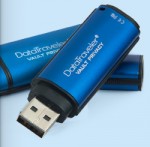 First, let it be said this is general advice if you can’t read a usb drive and you understand tampering with the device could lose all the data contained in the device.
I had a recovery job come in for a hardware encrypted USB key, when plugged into any USB port:
Device Not Recognized was the message.
This customer had flown to Grand Cayman and his encrypted data drive would not identify to let him get to his data.
In some cases salty air can corrode the contacts on USB devices, or pocket lint/trash can obscure the proper contact points on a flash drive from being readable.
You can take a standard Q-tip and crimp it down, pull off some of the cotton and push the stick back and forth to clean the USB contact points.
To do this the q-tip must be fairly tight fitting between the metal frame and the circuitboard on the end of the memory stick.
This quick cleaning kept him from having to have actual data recovery done on his device.
We then set him up a second device with truecrypt encryption and transferred all his documents onto that device in case the device in question failed.
How to fix a Logitech M505 mouse that stops working (unifying adapter)
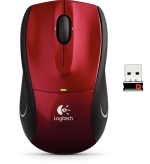 Q: Help, my Logitech M505 Mouse stopped working. I’ve changed the batteries but can’t get the mouse to work.
A: Often times wirless mice have a button to reset, this one does not.
Here’s how I solved the problem:
Take a pair of pliers, crimp the end of a Q-tip flat for about 1/2″.
Put the q-tip into the USB Unifying adapter and push it in and out along the contacts (there are 4)
This will clean any debris off of the contacts and allow them to work.
(in this case they could use it on their desktop, but not their laptop)
This trick will work to fix some flash drives that you can’t retrieve data from (anything that keeps the USB from communicating with the port on the computer, dirt grime, oxidation etc)
The Urban Legend of Multipass Hard Disk Overwrite
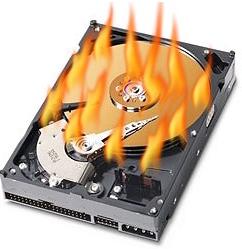 https://www.infosecisland.com/blogview/16130-The-Urban-Legend-of-Multipass-Hard-Disk-Overwrite.html
For those of you out there interested in ensuring data destruction via overwrites.
This is a great article about why old advice and worries may not be valid in data destruction.
How to check the smart status of a drive you believe is failing using ubuntu linux.
To make a ubuntu cd-rom, go to www.ubuntu.com get the LTS 10.10.10 i386 version and burn a cd-rom from the downloaded ISO file.
Alternatively, go to Pendrivelinux.com and download the pendrive utility and make a ubuntu 10.10.10 bootable 1gb thumb drive to boot from.
boot from either, click try ubuntu
click system, administration, disk utility
click on the drive you are worried about and open it full screen and look at the smart status, or click on smart data to see the details.
How to recover data from a hard disk that bluescreens when you try to repair/fix it with windows.
Video explains how to save data/backup data using linux on a drive that won’t mount in windows (or causes blue screen of death when you plug it into any windows system to attempt recovery.)
In this case it’s a western digital 640gb 2.5″ SATA drive that has failed.
Firefox add-ons you must download.

This is a list of awesome Add-ons for Firefox Comment below to add your’s to the list:
Ad Block Plus will remove annoying advertisements as well as check your site for what may be blocked by ad-blockers. You can even selectively block images or items on a particular site.
AddThis is a plugin that allows you to quickly share links that are interesting to you with a simple click and comment to Facebook, Twitter and more.
Webmaster tools:
Scribefire allows you to write articles, research information and keep it all organised in a tidy wsiwyg editor.
Firebug Is a handy tool that lets you break down how your html/php/css scripting is working and highlights as you drill down to find your problem.
Colorzilla is a color selection tool, if you ever wanted to know exactly what color orange the firefox logo is
Grease Monkey is a great scripting tool, allowing to to to almost anything, redirect video to a particular browser etc. Very useful on all platforms.
FireFtp is a FTP/SFTP integration for firefox allowing you to quickly index and upload files to the sites you are working on.
How to upload a personal video message to dropbox and create a qrcode to the public link
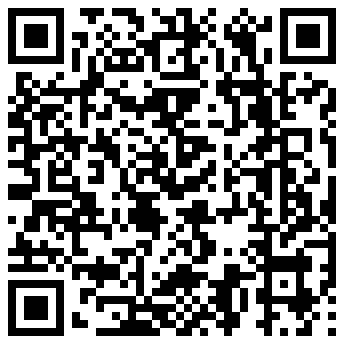 This is a short video on how to create a custom video message to embed in a card or an email for playing on another iphone/android simply by shooting the QR Code with the barcode scanner on the smart phone.
 Posted in General Computer Knowledge, Video |
  Tags: dropbox, iphone 4, qrcode, video mail |
  Comments Closed
Whitespace wiping, removing personal data while leaving the OS intact
A few of you out there have been asking me for how to wipe a hard disk for computer donation,
You can use a bootable nuke disk to wipe the drive and OS in one boot and answer a couple of questions ensuring you wish to toast your hard disk, but if you want to give that laptop to little Johnny, or Sue to use for school and you want to leave your OS intact it becomes more difficult.
Instructions for white space wiping and reasons for this:
If you wish to wipe the data from a partition, Simply delete all the information you wish to destroy, remove all internet caches, delete all history, and all temporary folders, a good program for this is ccleaner from ccleaner.com.
Then download TrueCrypt, and make a file container as big as the rest of the hard drive that is empty.
Once complete, you will have overwritten your data with an encrypted empty drive, thus destroying any file handles and other objects.
Then delete the file container you created.
If you do this 3 times, it’s almost impossible to retrieve anything from the drive, however with an electron scanning microscope, or a special hard disk circuit board and a good head eschew program it is still possible to retrieve latent data from the edges of your overwritten data.